TechShoper
Genuine Reviews • Unbiased Analysis
Building your own gaming PC is one of the most rewarding experiences for any gaming enthusiast. In 2025, the options for high-performance gaming components have never been better, with groundbreaking GPUs from NVIDIA and AMD, powerful CPUs from Intel and AMD, and cutting-edge technologies like DDR5 RAM, PCIe 5.0 SSDs, and advanced cooling solutions.
Whether you're a first-time builder looking to assemble a budget-friendly 1080p gaming rig or an experienced enthusiast aiming for a no-compromise 4K powerhouse, this comprehensive guide will walk you through everything you need to know. We've carefully curated component recommendations across multiple price points, ensuring you get the best performance and value for your investment.
Our expert recommendations cover CPUs, GPUs, motherboards, RAM, storage, cooling, power supplies, and cases. Each component has been thoroughly researched and tested to ensure compatibility, performance, and reliability. Let's build your dream gaming PC!
Perfect for 1080p gaming at high settings. This build delivers excellent performance for popular esports titles and AAA games without breaking the bank. Ideal for first-time builders and budget-conscious gamers.

Excellent 6-core processor perfect for 1080p gaming with outstanding single-thread performance.

Perfect 1080p powerhouse with DLSS 3 and ray tracing support for smooth gaming.

Solid AM5 motherboard with all essential features and built-in WiFi 6E.

Sweet spot for AMD Ryzen 7000 series with excellent price-to-performance.
Excellent for 1440p gaming at ultra settings with high refresh rates. This build offers the best balance of performance and value, capable of handling any modern game with ease.
20-core powerhouse with exceptional gaming and productivity performance.
Incredible 1440p performance with 16GB VRAM for future-proofing.
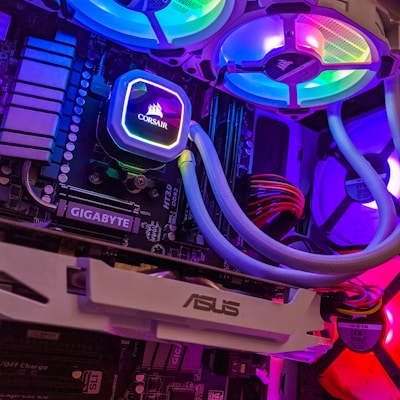
Blazing-fast PCIe 4.0 SSD with excellent endurance and reliability.

Top-tier air cooler with exceptional cooling performance and silent operation.
No-compromise 4K gaming at maximum settings with ray tracing enabled. This flagship build delivers absolute top-tier performance for the most demanding games and applications.
The best gaming CPU with 3D V-Cache technology for unmatched performance.
The absolute fastest gaming GPU with groundbreaking 4K and ray tracing performance.
Premium flagship motherboard with all the bells and whistles for enthusiasts.

Fully modular 1000W PSU with quiet operation and excellent efficiency.
What to Look For: The CPU is the brain of your gaming PC. For gaming, prioritize high single-thread performance and clock speeds. Intel's latest 14th Gen and AMD's Ryzen 7000 series with 3D V-Cache technology lead the pack. For 1080p gaming, 6-core CPUs are sufficient, while 1440p and 4K benefit from 8+ cores for streaming and multitasking.
What to Look For: Your GPU is the most critical component for gaming performance. NVIDIA's RTX 40-series offers DLSS 3 and superior ray tracing, while AMD's RX 7000-series provides excellent rasterization and more VRAM. Budget $300-500 for 1080p, $500-800 for 1440p, and $1000+ for 4K gaming.
What to Look For: Choose a motherboard that matches your CPU socket (AM5 for AMD, LGA 1700 for Intel). B650/B760 chipsets offer great value, while X670E/Z790 provide premium features. Ensure it has enough PCIe slots, M.2 slots, and USB ports for your needs. Built-in WiFi is a convenient plus.
What to Look For: 32GB DDR5 is the sweet spot for gaming in 2025. AMD Ryzen 7000 performs best with DDR5-6000 CL30-36, while Intel 14th Gen works well with DDR5-5600+. DDR4 is still viable for budget builds. Faster RAM provides diminishing returns beyond the optimal speeds.
What to Look For: Get at least 1TB, preferably 2TB for your game library. PCIe 4.0 NVMe SSDs offer the best balance of speed and value. PCIe 5.0 is overkill for gaming. Look for drives with good endurance ratings (TBW) and DRAM cache for better performance and longevity.
What to Look For: Air coolers like the DeepCool AK620 or Noctua NH-D15 offer excellent performance for most CPUs. High-end CPUs benefit from 240-360mm AIO liquid coolers. Ensure your cooler is compatible with your CPU socket and fits in your case with proper clearance.
What to Look For: Calculate your system's power draw and add 20-30% headroom. 650W for budget builds, 750-850W for mid-range, 1000W+ for high-end with RTX 4090. Choose 80+ Gold or higher for efficiency. Fully modular PSUs offer the cleanest cable management.
What to Look For: Choose a case that fits your motherboard size (ATX, Micro-ATX, Mini-ITX). Good airflow is essential—look for mesh front panels and multiple fan mounts. Ensure it can accommodate your GPU length and cooler height. Tempered glass side panels showcase your build beautifully.
Best Budget Build ($800-1000): Ryzen 5 7600X + RTX 4060 Ti delivers excellent 1080p performance with room for future upgrades on the AM5 platform.
Best Mid-Range Build ($1500-2000): Core i7-14700K + RX 7800 XT provides outstanding 1440p gaming and excellent productivity performance for content creators.
Best High-End Build ($3000+): Ryzen 9 7950X3D + RTX 4090 represents the absolute pinnacle of gaming performance with no compromises for 4K gaming.
Best Value Component: AMD Ryzen 5 7600X offers incredible gaming performance at just $199, making it the best value CPU for most gamers.
Best Future-Proof GPU: AMD RX 7800 XT with 16GB VRAM ensures you won't run into VRAM limitations for years to come.
Best Overall Platform: AMD's AM5 platform promises support through 2027+, offering an excellent upgrade path without changing motherboards.